

The Problem
AWS gives you a blank canvas, which is both a blessing and a curse:- Single-account sprawl: Many teams start with one AWS account and end up with staging and production resources tangled together. One bad IAM policy or accidental deletion affects everything.
- Network design paralysis: How many AZs? Public subnets, private subnets, or both? NAT Gateway (expensive) or something else? These decisions are hard to change later.
- EKS configuration complexity: Getting EKS right involves dozens of settings: add-ons, IAM roles for service accounts, node groups vs Karpenter, security groups, access management…
- Cost surprises: NAT Gateway charges, idle node capacity, and over-provisioned resources add up fast. By the time you notice, you’ve burned through budget.
How Kube Starter Kit Addresses This
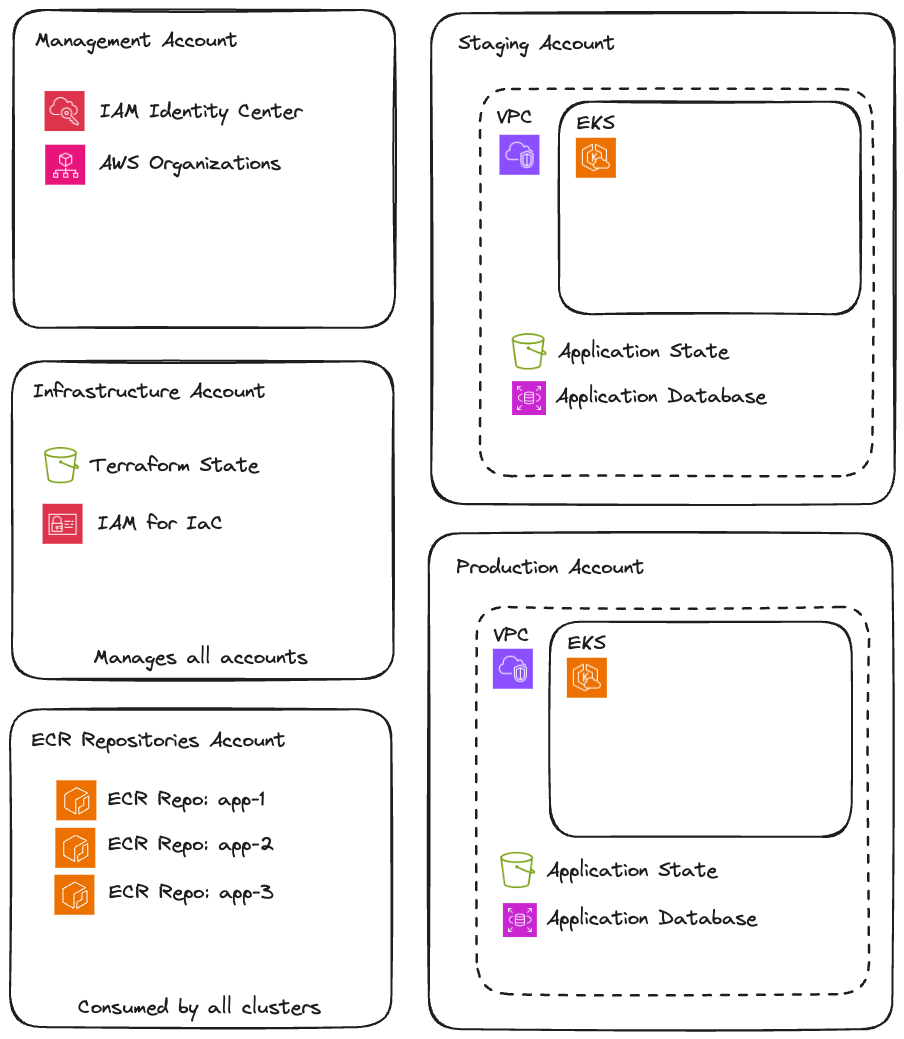
I’ve designed the AWS architecture in this kit based on patterns that balance security, cost, and operational simplicity: Multi-account by default: Staging and production live in separate AWS accounts. This provides hard isolation: a mistake in staging can’t affect production resources, IAM policies are naturally scoped, and billing is automatically separated. VPC with flexibility: Each environment gets a VPC spanning 3 availability zones with public and private subnets. The NAT configuration is pluggable: use AWS NAT Gateway for production reliability, or fck-nat for non-production cost savings. EKS with sensible defaults: The cluster comes pre-configured with essential add-ons (CoreDNS, VPC CNI, EBS CSI driver), proper IAM integration via AWS SSO, and a base node group sized for running Karpenter and critical workloads. Karpenter for right-sized compute: Instead of managing multiple node groups for different workload types, Karpenter provisions exactly the nodes you need, when you need them. Less waste, less management.What’s Included
Account Structure
VPC Architecture
Each environment VPC includes:EKS Cluster Configuration
Managed Add-ons
Managed Add-ons
Pre-configured and version-pinned:
- CoreDNS: Cluster DNS
- VPC CNI: Pod networking with native AWS IPs
- kube-proxy: Service networking
- EBS CSI Driver: Persistent volume support
- Pod Identity Agent: Modern pod-level IAM
Node Configuration
Node Configuration
- Base node group: 2-3 nodes running Karpenter and critical infrastructure
- Karpenter: Provisions workload nodes on-demand with right-sized instances
- ARM64 support: Graviton instances for cost savings where compatible
Access Management
Access Management
- AWS SSO integration: Cluster access via IAM Identity Center
- IRSA enabled: Pods can assume IAM roles without node-level credentials
- Pod Identity: Newer, simpler alternative to IRSA for pod-level AWS access
Cost Optimization
The kit includes several cost-conscious choices:- fck-nat for non-production: NAT Gateway costs
~$32/monthper AZ just to exist PLUS$0.045/GBprocessed. fck-nat runs on at4g.nano (~$3/month)and handles typical dev/staging traffic fine. - Karpenter consolidation: Automatically bins packs workloads and removes underutilized nodes.
- Spot instances: Karpenter can provision spot instances for fault-tolerant workloads.
- Right-sized base nodes: The base node group uses smaller instances since it only runs infrastructure components.