> ## Documentation Index
> Fetch the complete documentation index at: https://kubestarterkit.com/llms.txt
> Use this file to discover all available pages before exploring further.
# AWS Architecture
> Multi-account setup with VPC, EKS, and proper IAM boundaries
## The Problem
AWS gives you a blank canvas, which is both a blessing and a curse:
* **Single-account sprawl:** Many teams start with one AWS account and end up with staging and production resources tangled together. One bad IAM policy or accidental deletion affects everything.
* **Network design paralysis:** How many AZs? Public subnets, private subnets, or both? NAT Gateway (expensive) or something else? These decisions are hard to change later.
* **EKS configuration complexity:** Getting EKS right involves dozens of settings: add-ons, IAM roles for service accounts, node groups vs Karpenter, security groups, access management...
* **Cost surprises:** NAT Gateway charges, idle node capacity, and over-provisioned resources add up fast. By the time you notice, you've burned through budget.
## How Kube Starter Kit Addresses This
I've designed the AWS architecture in this kit based on patterns that balance security, cost, and operational simplicity:
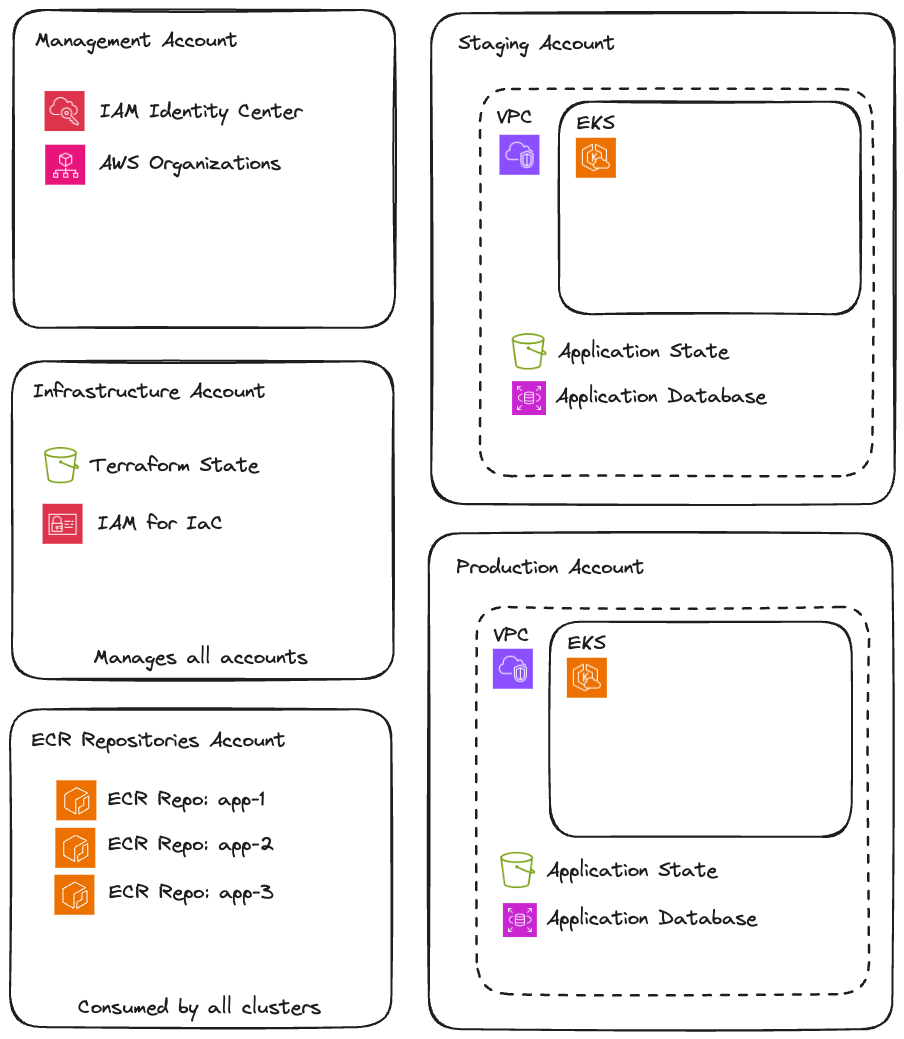
**Multi-account by default:** Staging and production live in separate AWS accounts. This provides hard isolation: a mistake in staging can't affect production resources, IAM policies are naturally scoped, and billing is automatically separated.
**VPC with flexibility:** Each environment gets a VPC spanning 3 availability zones with public and private subnets. The NAT configuration is pluggable: use AWS NAT Gateway for production reliability, or [fck-nat](https://fck-nat.dev/) for non-production cost savings.
**EKS with sensible defaults:** The cluster comes pre-configured with essential add-ons (CoreDNS, VPC CNI, EBS CSI driver), proper IAM integration via AWS SSO, and a base node group sized for running Karpenter and critical workloads.
**Karpenter for right-sized compute:** Instead of managing multiple node groups for different workload types, Karpenter provisions exactly the nodes you need, when you need them. Less waste, less management.
## What's Included
### Account Structure
```
AWS Organization
├── Management Account
│ ├── AWS Organizations
│ ├── IAM Identity Center (Manages user access across all accounts)
│ └── Consolidated Billing
├── Infrastructure Account
│ ├── GitHub OIDC Provider
│ ├── Terraform State Bucket
│ └── IAM Roles for Terraform Automation (Manages all account infrastructure)
├── ECR Account
│ └── ECR Repositories (Consumed by staging + production)
├── Staging Account
│ ├── VPC
│ ├── EKS Cluster
│ ├── Secrets Manager
│ ├── Route 53 Hosted Zone
│ └── Application-specific Resources (IAM roles, S3, etc.)
└── Production Account
├── VPC
├── EKS Cluster
├── Secrets Manager
├── Route 53 Hosted Zone
└── Application-specific Resources (IAM roles, S3, etc.)
```
 ### VPC Architecture
Each environment VPC includes:
| Component | Configuration |
| ---------------------- | ----------------------------------------------------------------------------------------------------------------------------------------- |
| **Availability Zones** | 3 AZs for high availability |
| **Public Subnets** | For load balancers and NAT |
| **Private Subnets** | For EKS nodes and workloads |
| **NAT** | Configurable: [AWS NAT Gateway](https://docs.aws.amazon.com/vpc/latest/userguide/vpc-nat-gateway.html) or [fck-nat](https://fck-nat.dev/) |
| **Subnet Tagging** | Pre-configured for Karpenter discovery |
| **Bastion Host** | Optional EC2 instance for private EKS API access via SSM |
### EKS Cluster Configuration
Pre-configured and version-pinned:
* **CoreDNS:** Cluster DNS
* **VPC CNI:** Pod networking with native AWS IPs
* **kube-proxy:** Service networking
* **EBS CSI Driver:** Persistent volume support
* **Pod Identity Agent:** Modern pod-level IAM
* **Base node group:** 2-3 nodes running Karpenter and critical infrastructure
* **Karpenter:** Provisions workload nodes on-demand with right-sized instances
* **ARM64 support:** Graviton instances for cost savings where compatible
* **AWS SSO integration:** Cluster access via IAM Identity Center
* **IRSA enabled:** Pods can assume IAM roles without node-level credentials
* **Pod Identity:** Newer, simpler alternative to IRSA for pod-level AWS access
### Cost Optimization
The kit includes several cost-conscious choices:
* **fck-nat for non-production:** NAT Gateway costs `~$32/month` per AZ just to exist PLUS `$0.045/GB` processed. fck-nat runs on a `t4g.nano (~$3/month)` and handles typical dev/staging traffic fine.
* **Karpenter consolidation:** Automatically bins packs workloads and removes underutilized nodes.
* **Spot instances:** Karpenter can provision spot instances for fault-tolerant workloads.
* **Right-sized base nodes:** The base node group uses smaller instances since it only runs infrastructure components.
## Key Design Decisions
| Decision | Rationale |
| ------------------------------------- | --------------------------------------------------------------------------------------------------------------------------- |
| **Multi-account over single account** | Hard isolation between environments. Can't accidentally affect production from staging. Cleaner IAM boundaries. |
| **3 AZs** | Balance between availability and cost. 2 AZs risk losing half capacity; more than 3 adds cost without proportional benefit. |
| **Private subnets for nodes** | Nodes don't need public IPs. Reduces attack surface and simplifies security groups. |
| **Karpenter over Cluster Autoscaler** | Faster scaling, better bin-packing, supports mixed instance types without managing multiple node groups. |
| **EKS managed add-ons** | AWS handles upgrades and compatibility. Less operational burden than self-managed. |
### VPC Architecture
Each environment VPC includes:
| Component | Configuration |
| ---------------------- | ----------------------------------------------------------------------------------------------------------------------------------------- |
| **Availability Zones** | 3 AZs for high availability |
| **Public Subnets** | For load balancers and NAT |
| **Private Subnets** | For EKS nodes and workloads |
| **NAT** | Configurable: [AWS NAT Gateway](https://docs.aws.amazon.com/vpc/latest/userguide/vpc-nat-gateway.html) or [fck-nat](https://fck-nat.dev/) |
| **Subnet Tagging** | Pre-configured for Karpenter discovery |
| **Bastion Host** | Optional EC2 instance for private EKS API access via SSM |
### EKS Cluster Configuration
Pre-configured and version-pinned:
* **CoreDNS:** Cluster DNS
* **VPC CNI:** Pod networking with native AWS IPs
* **kube-proxy:** Service networking
* **EBS CSI Driver:** Persistent volume support
* **Pod Identity Agent:** Modern pod-level IAM
* **Base node group:** 2-3 nodes running Karpenter and critical infrastructure
* **Karpenter:** Provisions workload nodes on-demand with right-sized instances
* **ARM64 support:** Graviton instances for cost savings where compatible
* **AWS SSO integration:** Cluster access via IAM Identity Center
* **IRSA enabled:** Pods can assume IAM roles without node-level credentials
* **Pod Identity:** Newer, simpler alternative to IRSA for pod-level AWS access
### Cost Optimization
The kit includes several cost-conscious choices:
* **fck-nat for non-production:** NAT Gateway costs `~$32/month` per AZ just to exist PLUS `$0.045/GB` processed. fck-nat runs on a `t4g.nano (~$3/month)` and handles typical dev/staging traffic fine.
* **Karpenter consolidation:** Automatically bins packs workloads and removes underutilized nodes.
* **Spot instances:** Karpenter can provision spot instances for fault-tolerant workloads.
* **Right-sized base nodes:** The base node group uses smaller instances since it only runs infrastructure components.
## Key Design Decisions
| Decision | Rationale |
| ------------------------------------- | --------------------------------------------------------------------------------------------------------------------------- |
| **Multi-account over single account** | Hard isolation between environments. Can't accidentally affect production from staging. Cleaner IAM boundaries. |
| **3 AZs** | Balance between availability and cost. 2 AZs risk losing half capacity; more than 3 adds cost without proportional benefit. |
| **Private subnets for nodes** | Nodes don't need public IPs. Reduces attack surface and simplifies security groups. |
| **Karpenter over Cluster Autoscaler** | Faster scaling, better bin-packing, supports mixed instance types without managing multiple node groups. |
| **EKS managed add-ons** | AWS handles upgrades and compatibility. Less operational burden than self-managed. |